Operun
MV3 native · Store Edition: zero debugger · local-first

Automate Repetitive Back-Office Work in Your Browser

Cloud-Brain, Edge-Hands Chrome Extension & Enterprise Kernel

Automate repetitive back-office workflows, ad platform reconciliations, and candidate sourcing in your browser, with credentials kept on your device.

No eval, no remote code No debugger bar (Store Standard Edition) Zero trackers inside the extension
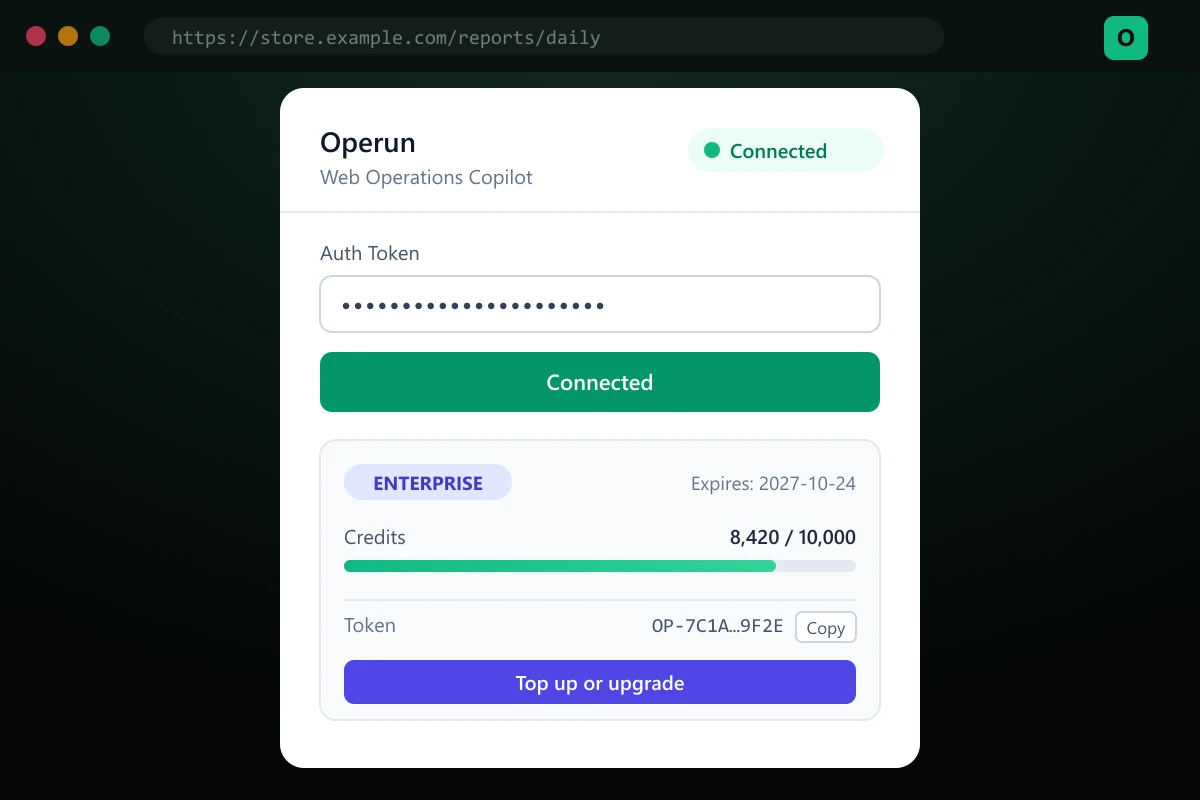
Operun Chrome extension popup connected on the Enterprise tier, showing remaining credits and the runner token Connected · ENTERPRISE
Operun popup preview
operun — cloud-brain, edge-hands

$ operun browser act --action navigate

// dispatched to runner runner_84f2

"action": "navigate",

"url": "https://store.example.com/orders"

$ operun browser act --action snapshot

✓ navigate → ok · 42 ms

✓ snapshot → 1 step · 38 ms

task #7c1a quota reserved & settled · 1 credit · no state retained

Store Edition: 0 debugger 0 eval 0 remote code Extension ships with zero trackers Designed for Google Limited Use compliance

Why Operun

Hand off the busywork,
keep the control

Less time on exports and reconciliations, no new risk to your accounts, and the same correct result on every run.

Automate Repetitive Back-Office Workflows

Report exports, ad spend reconciliation, inventory pulls and candidate sourcing: the repetitive clicks your team does every day, handed to a ready-made playbook instead of a person.

Store Edition: No Debugger Banner, Minimal Risk & Local-First Isolation

The Store Standard Edition runs without the debugger permission, so no yellow "is debugging this browser" banner. The Enterprise Operator Edition (transient CDP physical automation) may show it briefly during a click. Credentials stay on your device, and every run happens in your own logged-in session on pages you choose.

Deterministic & Turnkey Execution

Fixed, reviewed steps instead of probabilistic exploration: the same input gives the same report every time. Built for e-commerce finance and other workflows where a wrong number is not an option.

How it works

From install to automation in three steps

01

Install

Add Operun from Microsoft Edge Add-ons or the Chrome Web Store. The MV3 build asks for nothing but the minimum permissions it needs to act on pages you choose.

02

Connect

Open the popup, paste your runner token, and connect. The edge hands are ready — the cloud brain takes it from here.

03

Automate

Describe the workflow. Operun navigates, clicks, types and captures, settling each step through an in-flight reservation as it goes.

The Ecosystem

Built by Battle-Tested Builders

Operun is part of our proven AI and web intelligence ecosystem.

PS

PromptShifu

AI Prompt Engineering & Workflow Platform

Empowering creators and developers with enterprise-grade prompt orchestration and AI engineering frameworks.

Visit PromptShifu
EC

EasyCatch

Web Intelligence & Data Extraction Engine

Scalable web data and intelligence infrastructure trusted by data teams globally.

Visit EasyCatch
Founder's note
“With years of experience running production AI tools and web intelligence pipelines, Operun is engineered from the ground up for extreme reliability, zero-leakage security, and non-stop enterprise workflows.”

Enterprise trust

Documented runs and the safeguards behind them

Each figure below comes from a run record published on a skill page. The environment, the date and the measurement caveats sit next to the numbers, so you can judge them yourself.

Shopee · Live vouchers

Multi-store live-voucher deployment

On a 22-store Shopee account, Operun created 10 live vouchers and read every code back from the voucher list before counting it as done. Machine time was about 40 minutes, with 5 minutes of human involvement and the rest unattended. The gain is verifiability and unattended time, not raw speed.

Verified 2026-10-27 · real Chrome session · Enterprise Operator Edition

Read the run record →
Shopee · Fulfillment + ERP

Multi-region fulfillment and ERP reconciliation

Across 6 regional Shopee stores, Operun matches the daily ERP dispatch report against pending orders and binds tracking numbers, isolating exceptions in a separate triage sheet. The daily human step went from about 2.5 hours to a 3-minute review.

Verified 2026-10-24 · 6 active regional stores · real browser session

Read the run record →
1688 · Shopify

1688 to Shopify CSV export

A published 5-step pipeline for exporting 1688 listings as a Shopify import CSV. No measured time saving is published for it yet, and the skill page says so instead of showing an estimate.

Synced from SkillHub v1.0.1 · measurement pending

Read the run record →
  • Credentials stay on your device

    Passwords, cookies and session tokens are processed in local memory. They are not written to disk or uploaded.

  • Your own logged-in browser

    Runs happen in the Chrome session you already use, on pages you choose, so you keep control of what is touched.

  • Read-back verification

    A step counts as done only after the result is read back from the platform, not when a confirmation dialog appears.

  • Minimal cloud traffic

    The cloud control plane receives only the commands and results needed to orchestrate a run.

  • Edition-specific permissions

    The Store Standard Edition does not request the debugger permission and ships without eval or remote code. The Operator Edition uses transient CDP physical input, and the browser may show its debugging bar briefly.

  • Metered, auditable runs

    Each step consumes one credit through an atomic reservation, so usage matches the work that was done.

Pricing

Pay for the work, not the worry

Metered credits, settled atomically. Start small, scale when the automation does.

Starter

For individuals automating their own repetitive tasks.

$9.9 /month

2,000 credits / month

  • MV3 store build (zero debugger)
  • Single runner connection
  • Core actions: click, type, navigate, snapshot
  • Local-first memory & ephemeral sessions
  • Community support
Most popular

Pro

For professionals and small teams running daily automation.

$29 /month

10,000 credits / month

  • Everything in Starter
  • Higher credit ceiling & priority queue
  • Advanced workflows & scheduling
  • Enterprise Operator Edition (transient CDP for deep network capture & physical clicks, direct download)
  • Email support

Enterprise

For organizations with dedicated capacity and compliance needs.

Custom

Custom credit pools

  • Everything in Pro
  • Unlimited concurrent runners
  • Self-hosted on-premise cloud core
  • Custom workflow & environment tailoring for enterprise operations, with 1-on-1 engineering support
  • SLA & dedicated account manager
Contact sales

Need details on credits, quotas or billing? See the FAQ.

FAQ

Questions enterprise teams ask first

Will my store account get banned?

We cannot promise that a platform will never restrict an account, and no automation tool honestly can. What Operun does is narrow the gap with normal use: it runs inside your own local Chrome, in a session you have already logged in to, and the Operator Edition sends transient physical clicks and keystrokes through the real browser instead of calling platform interfaces. Your credentials never leave the machine, and you decide which pages it acts on. Follow each platform's seller rules, start with a small batch, and review the first runs yourself.

Where does my data go?

Credentials, cookies and session tokens stay in your device's memory. They are not written to disk or uploaded. Files the browser downloads stay in your local folders. The cloud control plane receives only the commands and results needed to orchestrate a run.

Do you support private deployment or custom ERP skills?

Yes, through the Enterprise plan: a self-hosted on-premise cloud core, workflows and environments tailored to your operations with 1-on-1 engineering support, and an SLA with a dedicated account manager. Tell us which ERP and which exports you rely on, and we will scope the skill with you.

Talk to us about private deployment →

Does Operun show a yellow debugging bar?

The Store Standard Edition does not request the debugger permission, so the bar does not appear. The Enterprise Operator Edition uses transient CDP physical input for hardware-level clicks and deep network capture, and the browser may show the bar briefly while it works.

Put your browser on autopilot

Install Operun, connect your runner, and let the cloud brain drive your edge hands — with credentials staying exactly where they belong: on your machine.

Book a demo · Enterprise

Tell us which workflow to automate

Leave your work email and pick the closest workflow. We will prepare a plan around how your team actually works.

We only use this email to reply to your request, never for bulk marketing. See our Privacy Policy.